We can surely look at it. We’ve done this for other companies where a particular component has been replaced by a newer model and the existing device driver is not capable of handling the new hardware. The component manufacturer may not have a compelling business reason to supply an OS/2 driver for the component, but perhaps there is still a need to access it from OS/2 or ArcaOS.
Contact us to discuss your needs. We work under short or long term contract, with full non-disclosure agreements. In short, your information is confidential, and we are dedicated to keeping OS/2 running.
We also provide extended support agreements for companies and enterprises in need of OS/2 talent to maintain their infrastructure.
We can surely look at it. We’ve done this for other companies, both on bare metal and in virtualized environments. Often, we’ve found that the original installation packages (if they ever did exist) are nowhere to be found. We can still work with what you have, given a functional image of an example system.
Contact us to discuss your needs. We work under short or long term contract, with full non-disclosure agreements. In short, your information is confidential, and we are dedicated to making existing OS/2 software continue to be useful.
We also provide extended support agreements for companies and enterprises in need of OS/2 talent to maintain their infrastructure.
Arca Noae engineers are monitoring the responses by hardware manufacturers and other operating system vendors. The current status of our analysis and official policy statement is reported in this blog post (which will be updated as necessary).
Additional information and links regarding these security concerns may be found in that post, as well.
Requesting a refund is a simple matter of using our contact form and submitting your request. Please note however that most sales are final.
There are no refunds for licensed software (ArcaOS) or for unused subscription terms, for example. Generally, this is because the licensing which we have to purchase does not allow for us to return a license to stock once it has been issued. This means that if we were to accept returns, we would actually have an unusable license coming back to us.
If there is something which is not quite working as expected, please let us know, either by using our contact page or by opening a support ticket. Perhaps it’s a known issue, or perhaps we are unaware of the problem, and may be able to look at addressing it with a software or documentation update. In any case, please give us an opportunity to address your concerns. We’re here to help.
Personal subscriptions and licenses entitle the holder to create support tickets in the bug tracker, and to access software updates. If a personal subscriber or licensee has a suggestion to make for a product enhancement, we will gladly listen to it. Support issues are handled on a best-effort basis, which means that resolving them may take anywhere from a few hours to a few months, depending upon how busy staff is supporting commercial subscribers and licensees.
Commercial subscribers and licensees, in contrast, receive prioritized support. This doesn’t always mean that problems will be resolved overnight, but efforts are first put into resolving issues reported by commercial subscribers and licensees, and when product enhancements are requested, these go to the top of the stack when we are considering where to expend our development efforts. In essence, commercial customers hold more sway, and their needs are always a priority for us, generally because we understand that mission-critical processes may be hanging in the balance, whereas personal subscribers and licensees should be using the software in non-business, and thus, non-critical environments.
Note also that the included term of support for some products may differ for personal vs commercial subscriptions. An example of this is ArcaOS, where the personal edition includes 6 months of technical support and updates, whereas the commercial edition includes one full year (12 months) of technical support and updates.
To reset your password, follow this link. Enter your email address or account name (often the same as your email address), and click the Reset password button.
You should receive an email from us within a few minutes containing a link to your personalized password reset page. If not, please check your spam trap. If the message was not caught in your spam trap, please contact us.
Either click the link or copy/paste it into your browser. You will be presented with a dialog which may look like one of these two, depending upon your browser:
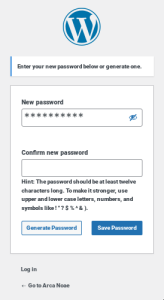
or:
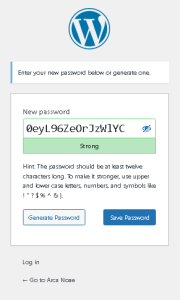
Enter a new password (the strength meter will remind you of the quality of your new password), and confirm it in the adjacent box, if presented. Click Save, and then proceed to the login page as usual, and use your new password to log in.
If your password reset link has expired, you will see a dialog such as this:
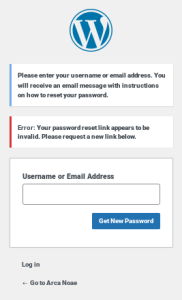
Simply enter your username or email address into the dialog box to restart the process. Note that sometimes, intervening spam filters may delay delivery of the reset email, resulting in multiple expired or invalid link notifications. In this case, please contact us, so that we may reset your password manually, after which you should set it again once logged in (see your Account Details page in your customer portal).
Note that this also changes the password for your login to the bug tracker.
When logging into the Arca Noae Mantis bug tracker, you must have an account on this site. The main site, the online store, and the Mantis bug tracker all use the same username (or email address) and password. If you have lost your password you can ask for a password reset via the account link above.
If resetting your password still does not allow you to log in. Please contact us.
We’re here to help!
First, check your email and ensure that you have received a copy of your order. Whether you have or have not, either go to the Contact page or send us an email directly to our support address explaining the situation. Please provide as much information as possible (date of order, order number, products ordered, whether you have received confirmation of payment from your credit or debit card provider, etc.). One of our staff will respond as quickly as possible, usually within a few hours.
No.
We do not have a license from IBM (who purchased Lotus Development Corporation) to resell or to otherwise incorporate Lotus SmartSuite in ArcaOS. In fact, IBM has discontinued support for SmartSuite on all platforms as of 2014. One of the primary goals of ArcaOS is to provide a supported solution for OS/2-based systems. Without developer support and without access to the code, we could not hope to achieve this goal.
SmartSuite for OS/2 Warp also lacks modern document import/export filters, such as those for recent (post-2000 or 2002) MS Office documents.
Our current recommendation is to consider Apache OpenOffice for OS/2, available through our technology partner, bww bitwiseworks, GmbH, which is easily installed in ArcaOS. Apache OpenOffice for OS/2 is current, supported, and capable of handling a wide array of modern document formats for importing and exporting, as well as direct creation of Adobe PDFs.
Of course, if you already have a license for Lotus SmartSuite for OS/2, there is no logistical reason why you could not simply install that under ArcaOS. You should check that your licensing for SmartSuite allows for such installation and use, however. In fact, all of your OS/2 and eComStation applications which run under Warp 4 and above should run just fine under ArcaOS (Blue Lion).
The easiest way is to register for an account on our website, here. This will subscribe you to email notifications from our blog. Note that there is no purchase required to register on the site, and we will never sell or otherwise share your information with any third parties (see our Privacy Policy for more details).