Tag Archives: upgrade

ArcaOS

ArcaOS 5.1.2 now available

Arca Noae is proud to announce the general availability of ArcaOS 5.1.2 in English, German, Spanish, and Russian.

ArcaOS 5.1.2 improves the support for installation on the latest generation of UEFI-based systems, as well as the ability to install to GPT-based disk layouts. This enables ArcaOS 5.1.2 to install on a wide array of modern hardware. As with all ArcaOS releases, ArcaOS 5.1.2 still boots, installs, and runs well on traditional BIOS-based systems, offering enhanced stability and performance for either environment.

This release is free of charge to those with active ArcaOS 5.1 Support & Maintenance subscriptions, and there is no charge for requesting additional language ISOs (though your total number of ArcaOS 5.1 installations may not exceed the number of ArcaOS 5.1 licenses you have).

ArcaOS 5.1.2 can be used for new installs or to upgrade any prior English version of ArcaOS 5. If installing from USB stick, the USB install stick may be created using any major operating system at hand (Windows, Linux, MacOS, and of course, OS/2, eComStation, and ArcaOS). Once built, the USB stick can be inserted into any USB port in the target system to boot into the ArcaOS installer/updater in either UEFI or traditional BIOS mode (alternatively, the DVD image may be burned to physical media and also booted to either UEFI or traditional BIOS systems). See the wiki for specific notes and limitations of the USB stick creation utility on Windows.

For a complete list of updates in this release, see the ArcaOS wiki. Be sure to review the README.TXT, as well, as this contains critical information to ensure that you get up and running fast, and includes tips for getting things adjusted right away.

This upgrade is available at a steep discount with your valid ArcaOS 5.0 Support & Maintenance subscription (and your remaining subscription time will be added to the included support term). To download your fresh ISO, simply visit your customer portal page and select the Download Center link on the navigation panel to the left. From there, click the “Upgrade to 5.1” button, and proceed to checkout.

If your ArcaOS 5.0 Support & Maintenance subscription has already expired, you may still upgrade at less than the cost of a new ArcaOS 5.1 license. Follow the procedure above to order your upgrade, and the discount will be reflected in your cart.

New ArcaOS 5.1.2 license purchases are initially built as English. To request a different language, simply visit your Download Center, select the Build ISO Again button, and choose your language.

Need more convincing? How about a commercial operating system which doesn’t spy on you, does not report your online activity to anyone, and gives you complete freedom to choose the applications you want to use, however you want to use them? How about an operating system which isn’t tied to any specific hardware manufacturer, allowing you to choose the platform which is right for you, and fits perfectly well in systems with less than 4GB of memory or even virtual machines?

Arca Noae is committed to continuing the development, support, maintenance, and refinement of the OS/2 platform. The next release of ArcaOS is indeed already in the works. The future continues to look bright for Arca Noae and ArcaOS!

Arca Noae Package Manager version 1.1.2 has been released

Arca Noae is pleased to announce the immediate availability of an updated Arca Noae Package Manager for ArcaOS, OS/2, and eComStation. (1.1.2)

This release addresses the following issues:

  • Replace DLL conflict check logic to avoid problems if an exception occurs in the DLL’s exit routine (requires included testdll.exe). (Previously, this condition could lead to a complete system hang during package installation or update.)
  • Redesigned UI presentation of available WarpIN packages.

Arca Noae Package Manager is available in English with Spanish, French, Italian, German, Dutch, Russian, and Swedish language packs. Language packs are on a rolling release cycle, with updates made available between program releases.

ANPM 1.1.2 requires WarpIN 1.0.24 or higher for installation. This WarpIN package is available from Hobbes Archive.

This utility is licensed under the GPLv3, and is available to everyone, free of charge. See the included documentation for instructions on how to access the source code.

Please review the wiki for important first-time installation and upgrade notes and other tips.

ArcaOS

Why update or upgrade to ArcaOS 5.1.1?

If you’re holding off upgrading from ArcaOS 5.0 to 5.1 or updating from 5.1.0 to 5.1.1, here are a few things to consder to get you off the fence.

ArcaOS 5.1.1, over a year and a half in development, incorporates over 50 improvements and refinements, from smoother installation and better integration with other operating systems to better stability and usability of the system. Here are a few points to consider from the changelog:

  • Now available in four languages (with more on the way): English, German, Spanish, and Russian. More comfortable computing in your native language? This is all made easier with ArcaOS 5.1.1.
  • For existing English installations, upgrading from 5.0 or updating from 5.1.0 could not be easier. Back up your system, boot from the installation media, select the option to update/upgrade, and select your existing installation from the list. The rest of the procedure is automatic.
  • Multimedia support has been upgraded and enhanced. Not only has the multimedia subsystem been translated to the system language, but if you have a CD collection and a modern PC, ArcaOS now handles digital transfers and supports the GnuDB CD track identification database.
  • Both remote control of the ArcaOS system and control of other systems from ArcaOS has been greatly enhanced with a new VNC server and client, supporting features found in UltraVNC, such as chat, file transfer, and encryption for web clients.
  • Of course we’ve also included the latest ACPI and updated device drivers for USB, video, mouse (new, major revision), FAT32 filesystem (for better interoperability and data exchange with other operating systems), and even a new keyboard driver for better operation on more hardware.

In short, 5.1.1 is the most stable, best performing ArcaOS release to date, and provides a truly modern OS/2 computing experience for PCs. It’s also quite at home in a virtual environment, running under Oracle VirtualBox or VMware ESXi or Workstation.

Best of all, for ArcaOS 5.1 licensees with active support subscriptions, the update from 5.1.0 to 5.1.1 is absolutely free. Let your subscription lapse? You can still renew and get the 5.1.1 release for no additional charge. Still running 5.0? Now is a great time to take advantage of the steep upgrade discounts offered to upgraders.


ArcaOS

ArcaOS 5.1.1 now available

Arca Noae is proud to announce the general availability of ArcaOS 5.1.1 in English, German, Spanish, and Russian.

ArcaOS 5.1.1 continues to support installation on the latest generation of UEFI-based systems, as well as the ability to install to GPT-based disk layouts. This enables ArcaOS 5.1.1 to install on a wide array of modern hardware. Of course, ArcaOS 5.1.1 is just as much at home on traditional BIOS-based systems, offering enhanced stability and performance across both environments.

This release is free of charge to those with active ArcaOS 5.1 Support & Maintenance subscriptions, and there is no charge for requesting additional language ISOs (though your total number of ArcaOS 5.1 installations may not exceed the number of ArcaOS 5.1 licenses you have).

ArcaOS 5.1.1 can be used for new installs or to upgrade any prior English version of ArcaOS 5. If installing from USB stick, the USB install stick may be created using any major operating system at hand (Windows, Linux, MacOS, and of course, OS/2, eComStation, and ArcaOS). Once built, the USB stick can be inserted into any USB port in the target system to boot into the ArcaOS installer/updater in either UEFI or traditional BIOS mode (alternatively, the DVD image may be burned to physical media and also booted to either UEFI or traditional BIOS systems).

For a complete list of updates in this release, see the ArcaOS wiki. Be sure to review the README.TXT, as well, as this contains critical information to ensure that you get up and running fast, and includes tips for getting things adjusted right away.

This upgrade is available at a steep discount with your valid ArcaOS 5.0 Support & Maintenance subscription (and your remaining subscription time will be added to the included support term). To download your fresh ISO, simply visit your customer portal page and select the Download Center link on the navigation panel to the left. From there, click the “Upgrade to 5.1” button, and proceed to checkout.

If your ArcaOS 5.0 Support & Maintenance subscription has already expired, you may still upgrade at less than the cost of a new ArcaOS 5.1 license. Follow the procedure above to order your upgrade, and the discount will be reflected in your cart.

New ArcaOS 5.1.1 license purchases are initially built as English. To request a different language, simply visit your Download Center, select the Build ISO Again button, and choose your language.

Need more convincing? How about a commercial operating system which doesn’t spy on you, does not report your online activity to anyone, and gives you complete freedom to choose the applications you want to use, however you want to use them? How about an operating system which isn’t tied to any specific hardware manufacturer, allowing you to choose the platform which is right for you, and fits perfectly well in systems with less than 4GB of memory or even virtual machines?

Arca Noae is committed to continuing the development, support, maintenance, and refinement of the OS/2 platform. The next release of ArcaOS is already in the works. The future looks bright for Arca Noae and ArcaOS!

ArcaOS

ArcaOS named Best Alternative OS of 2025 by TechRadar!

It is always gratifying to receive acclaim from our peers and the educated press. It seems that TechRadar has listed ArcaOS as #1 in their list of Best alternative operating systems of 2025, albeit with some slight misstatements in their overview (which we have brought to their attention).

One of the points which is specifically incorrect is the negative notion that ArcaOS is “for older PCs.” ArcaOS 5.1 should install on many or most new or recent Intel or AMD-based hardware. It is capable of booting on UEFI-only systems, without the aid of a CSM, using our proprietary 64-bit UEFI loader, and then booting ArcaOS (which itself is 32-bit) just as it would on a traditional BIOS system.

ArcaOS 5.1 also supports booting from GPT partitioned media, making it a great companion OS for multiboot configurations where the disk (or SSD) has already been partitioned this way and where it may be impractical to wipe and convert to MBR-style partitioning.

In fact, it is also something to note that ArcaOS is specifically not intended for use on “older” hardware, such as ISA, EISA, or MicroChannel, as most of the device drivers for those architectures were removed from ArcaOS prior to its initial release.

Another misstatement in the article pertained to pricing which quoted figures for licensing of the 5.0 release which itself is no longer available (though support for 5.0 continues with no stated EOL). Also, if you already have an ArcaOS 5.0 license, generous upgrade discounts apply should you want to move up to ArcaOS 5.1.

EAMaster 1.0

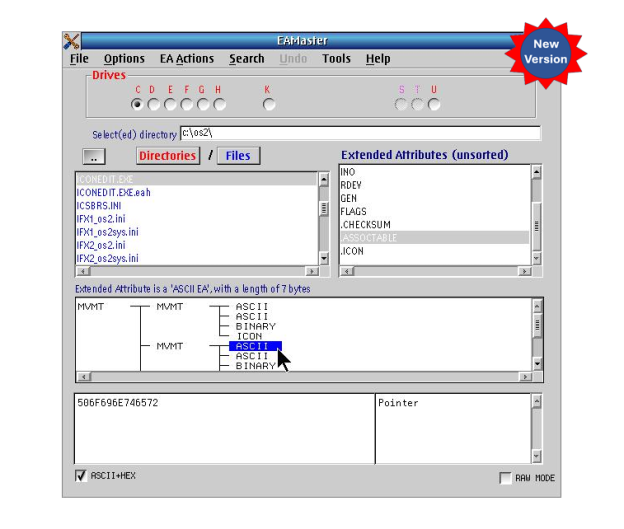
EAMaster has been updated to v1.2.1 with even more new features!

Following onto the October release of last year, Keith Merrington has again updated his handy EAMaster utility to v1.2.1. This latest build now includes three new tools:

  1. A tool to examine hold files produced by the EAUTIL OS/2 command or by EAMaster.
  2. A utility to search and optionally correct duplicate or incorrect long name.
  3. A utility to compare the EAs between directories.

If you already have a license for EAMaster, simply download the latest version (which should be available on Hobbes) and install to upgrade your current installation. Your existing registration will be recognized, and you’ll be good to go immediately.

If you don’t yet have a license, please visit our store for more information on this extremely useful package.

EAMaster 1.0

EAMaster has been updated to v1.0 with new features!

Keith Merrington has updated his handy EAMaster utility to v1.0. This latest build includes two new tools:

  1. A tool to examine files produced by the EAUTIL OS/2 command when stripping EA’s and saving them in a hold file.
  2. A utility to search and optionally correct duplicate or incorrect long name.

If you already have a license for EAMaster, simply download the latest version (which should be available on Hobbes) and install to upgrade your current installation. Your existing registration will be recognized, and you’ll be good to go immediately.

If you don’t yet have a license, please visit our store for more information on this useful package.

Warpstock 2024, Pittsburgh, PA

Couldn’t make it to Warpstock 2024 in Pittsburgh? Stream it live!

Warpstock 2024 begins this Friday, September 27, at 9am EDT.

Lewis Rosenthal and Alex Taylor will be among those presenting this year on a variety of topics of interest concerning ArcaOS. In addition, Lewis will be moderating a 2-part roundtable discussion focused on how people are using the OS/2 platform today, and how they see themselves using it in the future. For more details and for info on all sessions, please visit the event sessions page, and for the complete schedule, visit the event calendar.

Questions may be posed via YouTube Chat as well as IRC during the event.

The WarpEvents YouTube channel is the place to watch the event stream.

The URL for the #Warpstock IRC channel is: ircs://irc.libera.chat:6697/Warpstock (TLS encrypted),
or irc://irc.libera.chat/Warpstock (plain text), or https://web.libera.chat/  (web interface, type #Warpstock into the Channel field).

While visiting the Warpstock website, please consider donating. Warpstock Corporation is a recognized 501(c)3 non-profit organization promoting education, information, and social opportunities to those persons interested in computer operating systems and related software.

Warpstock 2023 videos now available

Videos of Warpstock 2023 presentations from earlier this month, including Arca Noae staff and developers featuring the latest ArcaOS news and how-to sessions are now available on YouTube in the WarpEvents channel.

Video topics include:

  • ArcaOS Roadmap
  • High-Resolution OS/2: The Sequel
  • ArcaOS 5.1
  • Is ArcaOS a DOS Gaming Mecca?
  • ArcaOS under and next to VMWare ESXi
  • UEFI vs Traditional BIOS: Which is Right?
  • …and much more