Tag Archives: store

Major website migration complete

To address unanticipated changes forced upon us by functional components used by our website and online store, we have migrated the main Arca Noae site to a different server on our network. We hope this solves the most pressing issues regarding site availability, performance, and checkout completion.

Meanwhile, this migration brings with it some changes to procedures, namely, population of subscription content lists in the Download and Renewal Center. The new process will refresh content for all subscribers over a longer period of time vs on-demand download of fresh driver packages (as an example). The change should be fairly transparent to the end user (when a download link is displayed, it will be functional, as before), but note that there may be some delay between the announcement of new or updated content and downloads actually being listed. We are continuing to work to improve this feature.

For all those who have experienced difficulty with renewals, for a limited time, we have extended the normal grace period to one full year before the late renewal fee is applied. This should give everyone ample time to renew his or her ArcaOS Support & Maintenance subscription(s) without concern. This is a limited time offer, however, so if you have been holding off on a renewal due to site frustrations, please do so now at your earliest convenience.
Website issues impacting new and renewal orders

Our most recent website updates (mandatory, for security reasons) seem to have led to some instabilities. We have worked to manage the situation while we continue to solve the underlying problem(s). In the interim, customers may experience intervals of exceptional slowness on the site and there is a potential for failed payment processing.

We apologize for the inconvenience. If your order fails to process, please try again.

Meanwhile, we believe we have solved the issue with renewal orders not properly displaying the required credit card input fields for payment. Renewal orders should add the renewal to the cart and land on the Shop page. From there, proceed to checkout. If you find that your link has taken you to the checkout page directly, select the link there to visit your shopping cart, then use the Proceed to checkout button (or use the Renew button for your subscription from your Download Center).

At times, changes to our website are forced upon us by the software developers, generally in response to a security concern. It is impossible to predict how an update to one facet of the site may impact something else. We do our best to handle these situations when they arise, and appreciate your patience.

MultiMac

AMouse driver package v4.01 released

Arca Noae is pleased to announce the immediate availability of a new release of our AMouse driver package.

This is a major update with significant parts of the code rewritten.  If you have ArcaOS version 5.1.1 then you already have this update. This update is now available for those who don’t have ArcaOS 5.1.1. The highlights of this update are:

  • Better handling of missing or emulated 8042.
  • Automatic mouse integration for VMware and Virtual Box.
  • Better handling of some PS/2 mice.
  • Better handling of some touchpoint devices.
  • Better NLV support.
  • Miscellaneous other minor fixes.

More information about the AMouse driver may be found in the wiki.

If you have ArcaOS, this driver package is available for download from the Arca Noae website as part of the Support & Maintenance subscription for your ArcaOS product. Please log into your account and see your ArcaOS order details page to access your software.

If you have an Arca Noae OS/2 & eCS Drivers and Software Subscription, this driver package is available for download from the Arca Noae website as part of your Arca Noae OS/2 & eCS Drivers and Software Subscription. Please log into your account in order to access your software.

If you are still running OS/2 and/or eComStation systems and haven’t yet purchased a software subscription, this is a great reason to do so now. It may also be a good time to consider moving up to ArcaOS.

ArcaOS

ArcaOS named Best Alternative OS of 2025 by TechRadar!

It is always gratifying to receive acclaim from our peers and the educated press. It seems that TechRadar has listed ArcaOS as #1 in their list of Best alternative operating systems of 2025, albeit with some slight misstatements in their overview (which we have brought to their attention).

One of the points which is specifically incorrect is the negative notion that ArcaOS is “for older PCs.” ArcaOS 5.1 should install on many or most new or recent Intel or AMD-based hardware. It is capable of booting on UEFI-only systems, without the aid of a CSM, using our proprietary 64-bit UEFI loader, and then booting ArcaOS (which itself is 32-bit) just as it would on a traditional BIOS system.

ArcaOS 5.1 also supports booting from GPT partitioned media, making it a great companion OS for multiboot configurations where the disk (or SSD) has already been partitioned this way and where it may be impractical to wipe and convert to MBR-style partitioning.

In fact, it is also something to note that ArcaOS is specifically not intended for use on “older” hardware, such as ISA, EISA, or MicroChannel, as most of the device drivers for those architectures were removed from ArcaOS prior to its initial release.

Another misstatement in the article pertained to pricing which quoted figures for licensing of the 5.0 release which itself is no longer available (though support for 5.0 continues with no stated EOL). Also, if you already have an ArcaOS 5.0 license, generous upgrade discounts apply should you want to move up to ArcaOS 5.1.

EAMaster 1.0

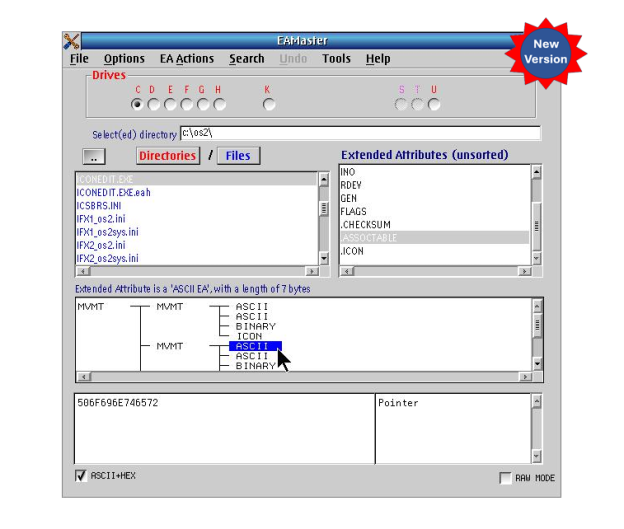
EAMaster has been updated to v1.2.1 with even more new features!

Following onto the October release of last year, Keith Merrington has again updated his handy EAMaster utility to v1.2.1. This latest build now includes three new tools:

  1. A tool to examine hold files produced by the EAUTIL OS/2 command or by EAMaster.
  2. A utility to search and optionally correct duplicate or incorrect long name.
  3. A utility to compare the EAs between directories.

If you already have a license for EAMaster, simply download the latest version (which should be available on Hobbes) and install to upgrade your current installation. Your existing registration will be recognized, and you’ll be good to go immediately.

If you don’t yet have a license, please visit our store for more information on this extremely useful package.