Archives

Where do I download my subscription software?

Software packages included as part of an ArcaOS Support & Maintenance subscription are generally accessible from the ArcaOS Download Center. To access the ArcaOS Download Center:

  1. Visit your customer portal on the main Arca Noae website. If not logged in, you may do so when accessing the above link.
  2. From the navigation links on the left, select ArcaOS Download Center to view the list of your ArcaOS licenses and associated downloads.

Software packages included as part of the OS/2 & eCS Drivers & Software subscription content are generally accessible from the order details page for the active subscription. To access the order details page:

  1. Visit your customer portal on the main Arca Noae website. If not logged in, you may do so when accessing the above link.
  2. From the navigation links on the left, select Orders & Subscriptions to view the list of your orders.
  3. Select the order containing your original subscription order (a renewal order will include a link to take you to the original order, identified as: Access associated downloads here).
  4. Click the View button for the selected order to access the order details page.

Once on the order details page, your subscription packages will be available for download by clicking on each link.

Some other subscription content will be made available in our subscription YUM repository. This is an authenticated repository which may be added to your YUM configuration or to Arca Noae Package Manager. You will need your Arca Noae credentials handy when adding the repository to your configuration. See this wiki page for more information and refer to Arca Noae Package Manager‘s online help for guidance in adding the subscription repository to your configuration.
How do I burn my ArcaOS image to a DVD?

First, the ArcaOS image is delivered in a compressed format. It generally must be decompressed before burning to disc. See this wiki page for more information. The important thing to remember is that the compressed file cannot be directly burned, as this will not yield a bootable disc.

How may I request a refund?

Requesting a refund is a simple matter of using our contact form and submitting your request. Please note however that most sales are final.

There are no refunds for licensed software (ArcaOS) or for unused subscription terms, for example. Generally, this is because the licensing which we have to purchase does not allow for us to return a license to stock once it has been issued. This means that if we were to accept returns, we would actually have an unusable license coming back to us.

If there is something which is not quite working as expected, please let us know, either by using our contact page or by opening a support ticket. Perhaps it’s a known issue, or perhaps we are unaware of the problem, and may be able to look at addressing it with a software or documentation update. In any case, please give us an opportunity to address your concerns. We’re here to help.

What’s the difference between personal and commercial levels of support?

Personal subscriptions and licenses entitle the holder to create support tickets in the bug tracker, and to access software updates. If a personal subscriber or licensee has a suggestion to make for a product enhancement, we will gladly listen to it. Support issues are handled on a best-effort basis, which means that resolving them may take anywhere from a few hours to a few months, depending upon how busy staff is supporting commercial subscribers and licensees.

Commercial subscribers and licensees, in contrast, receive prioritized support. This doesn’t always mean that problems will be resolved overnight, but efforts are first put into resolving issues reported by commercial subscribers and licensees, and when product enhancements are requested, these go to the top of the stack when we are considering where to expend our development efforts. In essence, commercial customers hold more sway, and their needs are always a priority for us, generally because we understand that mission-critical processes may be hanging in the balance, whereas personal subscribers and licensees should be using the software in non-business, and thus, non-critical environments.

Note also that the included term of support for some products may differ for personal vs commercial subscriptions. An example of this is ArcaOS, where the personal edition includes 6 months of technical support and updates, whereas the commercial edition includes one full year (12 months) of technical support and updates.

My password for the main website is not working. How may I reset it?

To reset your password, follow this link. Enter your email address or account name (often the same as your email address), and click the Reset password button.

You should receive an email from us within a few minutes containing a link to your personalized password reset page. If not, please check your spam trap. If the message was not caught in your spam trap, please contact us.

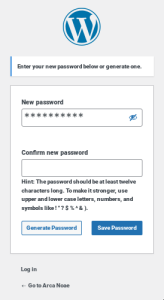
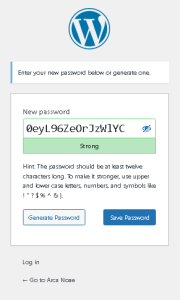
Either click the link or copy/paste it into your browser. You will be presented with a dialog which may look like one of these two, depending upon your browser:


or:

Enter a new password (the strength meter will remind you of the quality of your new password), and confirm it in the adjacent box, if presented. Click Save, and then proceed to the login page as usual, and use your new password to log in.

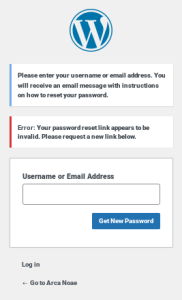
If your password reset link has expired, you will see a dialog such as this:

Simply enter your username or email address into the dialog box to restart the process. Note that sometimes, intervening spam filters may delay delivery of the reset email, resulting in multiple expired or invalid link notifications. In this case, please contact us, so that we may reset your password manually, after which you should set it again once logged in (see your Account Details page in your customer portal).

Note that this also changes the password for your login to the bug tracker.

I’m having a problem logging into the Arca Noae Mantis bug tracker. I cannot get my login to work. I just can’t. What do I do?

When logging into the Arca Noae Mantis bug tracker, you must have an account on this site. The main site, the online store, and the Mantis bug tracker all use the same username (or email address) and password. If you have lost your password you can ask for a password reset via the account link above.

If resetting your password still does not allow you to log in. Please contact us.

I’m having a problem using my software. What should I do?

  1. Best practices dictate that the first thing to do is check the documentation which came with the software. The documentation should provide some information as to where to go for technical support. If this is software or a driver which came from Arca Noae (either produced by us or sold through our store), then proceed to the next step.
  2. If the software or driver was produced by Arca Noae, your next stop for technical support should be either the main Support page or the Arca Noae wiki pages, directly. Every product developed by Arca Noae or licensed as an Arca Noae product has a support wiki. Find the wiki listed on that page. Usually, there is a link to a product-specific debugging, problem solving, or troubleshooting sub-wiki on the main product wiki. Follow the troubleshooting steps there. If this still does not help, or if the troubleshooting steps instruct you to do so, please open a ticket in the Mantis bug tracker, after gathering all of the information requested in the troubleshooting steps.
  3. If the software or driver was not produced by Arca Noae but was sold through our online store, and if the support information in the documentation is insufficient or if you do not receive a timely response from the developer, please contact customer service either through our Contact page or by emailing us directly at our customer service address. One of our staff will be happy to assist in getting you in touch with the developer. We do not handle tickets for software which we have not developed or licensed.
  4. If you are having a general problem with OS/2, eComStation, any other operating system, software, driver, or hardware which was not produced by Arca Noae nor purchased through our online store, please contact the developer or vendor of that component directly. Unless under support contract, we do not handle tickets for software which we have not developed or licensed.

I haven’t received my license key or software. What should I do?

We’re here to help!

First, check your email and ensure that you have received a copy of your order. Whether you have or have not, either go to the Contact page or send us an email directly to our support address explaining the situation. Please provide as much information as possible (date of order, order number, products ordered, whether you have received confirmation of payment from your credit or debit card provider, etc.). One of our staff will respond as quickly as possible, usually within a few hours.

Does ArcaOS 5.0 (Blue Lion) include Lotus SmartSuite for OS/2 Warp?

No.

We do not have a license from IBM (who purchased Lotus Development Corporation) to resell or to otherwise incorporate Lotus SmartSuite in ArcaOS. In fact, IBM has discontinued support for SmartSuite on all platforms as of 2014. One of the primary goals of ArcaOS is to provide a supported solution for OS/2-based systems. Without developer support and without access to the code, we could not hope to achieve this goal.

SmartSuite for OS/2 Warp also lacks modern document import/export filters, such as those for recent (post-2000 or 2002) MS Office documents.

Our current recommendation is to consider Apache OpenOffice for OS/2, available through our technology partner, bww bitwiseworks, GmbH, which is easily installed in ArcaOS. Apache OpenOffice for OS/2 is current, supported, and capable of handling a wide array of modern document formats for importing and exporting, as well as direct creation of Adobe PDFs.

Of course, if you already have a license for Lotus SmartSuite for OS/2, there is no logistical reason why you could not simply install that under ArcaOS. You should check that your licensing for SmartSuite allows for such installation and use, however. In fact, all of your OS/2 and eComStation applications which run under Warp 4 and above should run just fine under ArcaOS (Blue Lion).

Does ArcaOS 5.0 (Blue Lion) include HPFS386?

In a word, no.

HPFS386 is very old, and has not seen any maintenance or support for many years. Arca Noae has not licensed this component from IBM for distribution in Blue Lion, and would not be able to support it, in any case.

The 16-bit HPFS driver should be sufficient for anyone needing access to HPFS volumes, and this also works well for removable media, such as USB sticks.

We recommend that anyone who has needs which go beyond the limits of HPFS in terms of large volumes look to JFS. Like HPFS386, JFS supports long filenames, extended attributes, bad block relocation, direct inode-level support for ACLs (access control lists), and very large cache sizes. The maximum volume size for JFS is 2TB, vs just 64GB for HPFS386 (and 16-bit HPFS). The maximum file size is also 2TB, with a theoretical maximum number of files per directory of 4 billion.

JFS supports ‘sparse files’ (this allows, for example, large database structures to be created, but consume only the physical space required by the data actually stored in them).

JFS is a journaliing filesystem, so transactions (reads, writes, deletions, creations, moves, etc.) are logged in a (separate) “journal.” In the case of a crash, this data is used to ensure the integrity of the stored data. Generally, this leads to shorter times spent checking a JFS volume for errors than on a non-journaling filesystem, such as HPFS386 (assuming the journal itself has not been damaged and is readable).

Traditional JFS data (non-bootable) volumes support dynamic volume expansion. On-line expansion of an existing volume simply involves adding partitions to the existing volume, and the filesystem is automatically expanded.

While JFS still lacks some of HPFS386’s advanced features, such as RAID-1 fault tolerance, it is modern, maintainable, and robust; a good match for today’s larger disk drives.