Category Archives: New software releases

Announcements of new software packages and updates.

Driver updates now available

MultiMacWith the release of ArcaOS 5.1.2, several drivers have been updated. These updates are already included in ArcaOS 5.1.2, but if you are not updating to ArcaOS 5.1.2 you can still take advantage of some of the new driver updates. They are now available as part of the Support & Maintenance subscription for your ArcaOS product, and in the Arca Noae OS/2 & eCS Drivers and Software Subscription, Please log into your account and visit your Download & renewal center to access your software. Specifically, these updated packages are:

  • USB 12.18 (updated from 12.17)
  • NVME 1.03 (updated from 1.02)
  • ACPI 3.23.19 (updated from 3.23.18)
  • AMouse 4.02 (updated from 4.01)
  • Panorama 1.21 (updated from 1.20)

These releases include minor fixes and enhancements over their previous versions, and while recommended, they are not considered critical updates. Again, if you have updated to ArcaOS 5.1.2, you already have all of these updates. Here are the highlights of what’s new:

USB v12.18

  • USBAXGE – Enhanced to work with newer AX88179 chips.
  • USBASIX – Reliability updates.
  • USBMOS – Reliability updates.
  • USBSER – Fixed baud rate calculation for F232 chips

NVME v1.03

  • Fixed a rare trap when running multiple NVME controllers.

ACPI v3.23.19

  • Enhanced Power Manager to work better on systems with many CPUs.

AMouse v4.02

  • Added some command line switches

Panorama v1.21

  • Fixed an EDID problem when running the installer.

If you are still running OS/2 and/or eComStation systems and haven’t yet moved up to ArcaOS, this is a great reason to do so now. If you’ve already made the switch, but haven’t renewed renewed your support subscription, this is also a good time. Thinking of upgrading your current ArcaOS 5.0 installation? Now is also a good time.

If you have an Arca Noae OS/2 & eCS Drivers and Software Subscription, these driver package are available for download from the Arca Noae website as part of your Arca Noae OS/2 & eCS Drivers and Software Subscription. Please log into your account in order to access your software.

ArcaOS

ArcaOS 5.1.2 now available

Arca Noae is proud to announce the general availability of ArcaOS 5.1.2 in English, German, Spanish, and Russian.

ArcaOS 5.1.2 improves the support for installation on the latest generation of UEFI-based systems, as well as the ability to install to GPT-based disk layouts. This enables ArcaOS 5.1.2 to install on a wide array of modern hardware. As with all ArcaOS releases, ArcaOS 5.1.2 still boots, installs, and runs well on traditional BIOS-based systems, offering enhanced stability and performance for either environment.

This release is free of charge to those with active ArcaOS 5.1 Support & Maintenance subscriptions, and there is no charge for requesting additional language ISOs (though your total number of ArcaOS 5.1 installations may not exceed the number of ArcaOS 5.1 licenses you have).

ArcaOS 5.1.2 can be used for new installs or to upgrade any prior English version of ArcaOS 5. If installing from USB stick, the USB install stick may be created using any major operating system at hand (Windows, Linux, MacOS, and of course, OS/2, eComStation, and ArcaOS). Once built, the USB stick can be inserted into any USB port in the target system to boot into the ArcaOS installer/updater in either UEFI or traditional BIOS mode (alternatively, the DVD image may be burned to physical media and also booted to either UEFI or traditional BIOS systems). See the wiki for specific notes and limitations of the USB stick creation utility on Windows.

For a complete list of updates in this release, see the ArcaOS wiki. Be sure to review the README.TXT, as well, as this contains critical information to ensure that you get up and running fast, and includes tips for getting things adjusted right away.

This upgrade is available at a steep discount with your valid ArcaOS 5.0 Support & Maintenance subscription (and your remaining subscription time will be added to the included support term). To download your fresh ISO, simply visit your customer portal page and select the Download Center link on the navigation panel to the left. From there, click the “Upgrade to 5.1” button, and proceed to checkout.

If your ArcaOS 5.0 Support & Maintenance subscription has already expired, you may still upgrade at less than the cost of a new ArcaOS 5.1 license. Follow the procedure above to order your upgrade, and the discount will be reflected in your cart.

New ArcaOS 5.1.2 license purchases are initially built as English. To request a different language, simply visit your Download Center, select the Build ISO Again button, and choose your language.

Need more convincing? How about a commercial operating system which doesn’t spy on you, does not report your online activity to anyone, and gives you complete freedom to choose the applications you want to use, however you want to use them? How about an operating system which isn’t tied to any specific hardware manufacturer, allowing you to choose the platform which is right for you, and fits perfectly well in systems with less than 4GB of memory or even virtual machines?

Arca Noae is committed to continuing the development, support, maintenance, and refinement of the OS/2 platform. The next release of ArcaOS is indeed already in the works. The future continues to look bright for Arca Noae and ArcaOS!

Arca Noae Package Manager version 1.1.2 has been released

Arca Noae is pleased to announce the immediate availability of an updated Arca Noae Package Manager for ArcaOS, OS/2, and eComStation. (1.1.2)

This release addresses the following issues:

  • Replace DLL conflict check logic to avoid problems if an exception occurs in the DLL’s exit routine (requires included testdll.exe). (Previously, this condition could lead to a complete system hang during package installation or update.)
  • Redesigned UI presentation of available WarpIN packages.

Arca Noae Package Manager is available in English with Spanish, French, Italian, German, Dutch, Russian, and Swedish language packs. Language packs are on a rolling release cycle, with updates made available between program releases.

ANPM 1.1.2 requires WarpIN 1.0.24 or higher for installation. This WarpIN package is available from Hobbes Archive.

This utility is licensed under the GPLv3, and is available to everyone, free of charge. See the included documentation for instructions on how to access the source code.

Please review the wiki for important first-time installation and upgrade notes and other tips.

Dynamic Icons version 2.5.6 for ArcaOS released

Dynamic IconsDynamic Icons has been updated to version 2.5.6, and is now available as part of the Support & Maintenance subscription for your ArcaOS product. Please log into your account and see your ArcaOS order details page to access your software. This update is available for 5.0 and 5.1 ArcaOS licensees with active Support & Maintenance.
Version 2.5.6 introduces a new caching scheme which essentially eliminates duplicated icons, significantly reducing memory overhead and dramatically improves desktop responsiveness. In addition, it is now possible to specify different icon size parameters for Tree and Icon views, a longstanding and often requested enhancement.

For those who rely on Dynamic Icons, this update is a must-have.

Many, many thanks to Rich Walsh for his hard work on this update.

If you are still running OS/2 and/or eComStation systems and haven’t yet moved up to ArcaOS, this is a great reason to do so now. If you’ve already made the switch, but haven’t renewed renewed your support subscription, this is also a good time. Not sure what’s coming next? Have a look at our product roadmap pages.

ArcaOS

Why update or upgrade to ArcaOS 5.1.1?

If you’re holding off upgrading from ArcaOS 5.0 to 5.1 or updating from 5.1.0 to 5.1.1, here are a few things to consder to get you off the fence.

ArcaOS 5.1.1, over a year and a half in development, incorporates over 50 improvements and refinements, from smoother installation and better integration with other operating systems to better stability and usability of the system. Here are a few points to consider from the changelog:

  • Now available in four languages (with more on the way): English, German, Spanish, and Russian. More comfortable computing in your native language? This is all made easier with ArcaOS 5.1.1.
  • For existing English installations, upgrading from 5.0 or updating from 5.1.0 could not be easier. Back up your system, boot from the installation media, select the option to update/upgrade, and select your existing installation from the list. The rest of the procedure is automatic.
  • Multimedia support has been upgraded and enhanced. Not only has the multimedia subsystem been translated to the system language, but if you have a CD collection and a modern PC, ArcaOS now handles digital transfers and supports the GnuDB CD track identification database.
  • Both remote control of the ArcaOS system and control of other systems from ArcaOS has been greatly enhanced with a new VNC server and client, supporting features found in UltraVNC, such as chat, file transfer, and encryption for web clients.
  • Of course we’ve also included the latest ACPI and updated device drivers for USB, video, mouse (new, major revision), FAT32 filesystem (for better interoperability and data exchange with other operating systems), and even a new keyboard driver for better operation on more hardware.

In short, 5.1.1 is the most stable, best performing ArcaOS release to date, and provides a truly modern OS/2 computing experience for PCs. It’s also quite at home in a virtual environment, running under Oracle VirtualBox or VMware ESXi or Workstation.

Best of all, for ArcaOS 5.1 licensees with active support subscriptions, the update from 5.1.0 to 5.1.1 is absolutely free. Let your subscription lapse? You can still renew and get the 5.1.1 release for no additional charge. Still running 5.0? Now is a great time to take advantage of the steep upgrade discounts offered to upgraders.


MultiMac

AMouse driver package v4.01 released

Arca Noae is pleased to announce the immediate availability of a new release of our AMouse driver package.

This is a major update with significant parts of the code rewritten.  If you have ArcaOS version 5.1.1 then you already have this update. This update is now available for those who don’t have ArcaOS 5.1.1. The highlights of this update are:

  • Better handling of missing or emulated 8042.
  • Automatic mouse integration for VMware and Virtual Box.
  • Better handling of some PS/2 mice.
  • Better handling of some touchpoint devices.
  • Better NLV support.
  • Miscellaneous other minor fixes.

More information about the AMouse driver may be found in the wiki.

If you have ArcaOS, this driver package is available for download from the Arca Noae website as part of the Support & Maintenance subscription for your ArcaOS product. Please log into your account and see your ArcaOS order details page to access your software.

If you have an Arca Noae OS/2 & eCS Drivers and Software Subscription, this driver package is available for download from the Arca Noae website as part of your Arca Noae OS/2 & eCS Drivers and Software Subscription. Please log into your account in order to access your software.

If you are still running OS/2 and/or eComStation systems and haven’t yet purchased a software subscription, this is a great reason to do so now. It may also be a good time to consider moving up to ArcaOS.

Driver updates now available

MultiMacWith the release of ArcaOS 5.1.1, several drivers have been updated. These updates are already included in ArcaOS 5.1.1, but if you are not updating to ArcaOS 5.1.1 you can still take advantage of some of the new driver updates. They are now available as part of the Support & Maintenance subscription for your ArcaOS product, and in the Arca Noae OS/2 & eCS Drivers and Software Subscription, Please log into your account and visit your ArcaOS Download Center to access your software. Specifically, these updated packages are:

  • USB 12.17 (updated from 12.16)
  • Panorama 1.20 (updated from 1.19)
  • ACPI 3.23.18 (updated from 3.23.17)
  • Multimac

These releases include minor fixes and enhancements over their previous versions, and while recommended, are not considered critical updates. Again, if you have ArcaOS 5.1.1, you already have all of these updates. Here are the highlights of what’s new:

USB 12.17

  • Enhanced USBMOUSE to handle more mouse features.

Panorama 1.20

  • Enhanced to select font size for ArcaOS installer.
  • NLV enhancements.

ACPI 3.23.18

  • Fixed acpidump to work on more systems.

MultiMac

  • Minor updates to E1000B 1.1.9, MMAE 1.1.9, MMRE 1.1.10, and MMJME 1.1.4

If you are still running OS/2 and/or eComStation systems and haven’t yet moved up to ArcaOS, this is a great reason to do so now. If you’ve already made the switch, but haven’t renewed renewed your support subscription, this is also a good time. Thinking of upgrading your current ArcaOS 5.0 installation? Now is also a good time.

If you have an Arca Noae OS/2 & eCS Drivers and Software Subscription, these driver package are available for download from the Arca Noae website as part of your Arca Noae OS/2 & eCS Drivers and Software Subscription. Please log into your account in order to access your software.

ArcaOS

ArcaOS 5.1.1 now available

Arca Noae is proud to announce the general availability of ArcaOS 5.1.1 in English, German, Spanish, and Russian.

ArcaOS 5.1.1 continues to support installation on the latest generation of UEFI-based systems, as well as the ability to install to GPT-based disk layouts. This enables ArcaOS 5.1.1 to install on a wide array of modern hardware. Of course, ArcaOS 5.1.1 is just as much at home on traditional BIOS-based systems, offering enhanced stability and performance across both environments.

This release is free of charge to those with active ArcaOS 5.1 Support & Maintenance subscriptions, and there is no charge for requesting additional language ISOs (though your total number of ArcaOS 5.1 installations may not exceed the number of ArcaOS 5.1 licenses you have).

ArcaOS 5.1.1 can be used for new installs or to upgrade any prior English version of ArcaOS 5. If installing from USB stick, the USB install stick may be created using any major operating system at hand (Windows, Linux, MacOS, and of course, OS/2, eComStation, and ArcaOS). Once built, the USB stick can be inserted into any USB port in the target system to boot into the ArcaOS installer/updater in either UEFI or traditional BIOS mode (alternatively, the DVD image may be burned to physical media and also booted to either UEFI or traditional BIOS systems).

For a complete list of updates in this release, see the ArcaOS wiki. Be sure to review the README.TXT, as well, as this contains critical information to ensure that you get up and running fast, and includes tips for getting things adjusted right away.

This upgrade is available at a steep discount with your valid ArcaOS 5.0 Support & Maintenance subscription (and your remaining subscription time will be added to the included support term). To download your fresh ISO, simply visit your customer portal page and select the Download Center link on the navigation panel to the left. From there, click the “Upgrade to 5.1” button, and proceed to checkout.

If your ArcaOS 5.0 Support & Maintenance subscription has already expired, you may still upgrade at less than the cost of a new ArcaOS 5.1 license. Follow the procedure above to order your upgrade, and the discount will be reflected in your cart.

New ArcaOS 5.1.1 license purchases are initially built as English. To request a different language, simply visit your Download Center, select the Build ISO Again button, and choose your language.

Need more convincing? How about a commercial operating system which doesn’t spy on you, does not report your online activity to anyone, and gives you complete freedom to choose the applications you want to use, however you want to use them? How about an operating system which isn’t tied to any specific hardware manufacturer, allowing you to choose the platform which is right for you, and fits perfectly well in systems with less than 4GB of memory or even virtual machines?

Arca Noae is committed to continuing the development, support, maintenance, and refinement of the OS/2 platform. The next release of ArcaOS is already in the works. The future looks bright for Arca Noae and ArcaOS!

EAMaster 1.0

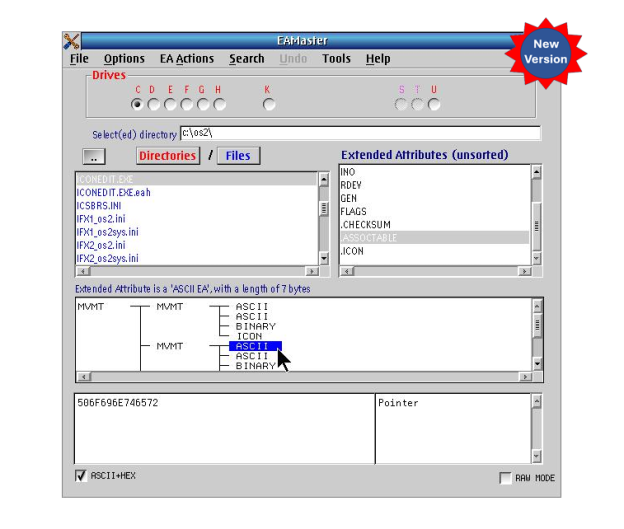
EAMaster has been updated to v1.2.1 with even more new features!

Following onto the October release of last year, Keith Merrington has again updated his handy EAMaster utility to v1.2.1. This latest build now includes three new tools:

  1. A tool to examine hold files produced by the EAUTIL OS/2 command or by EAMaster.
  2. A utility to search and optionally correct duplicate or incorrect long name.
  3. A utility to compare the EAs between directories.

If you already have a license for EAMaster, simply download the latest version (which should be available on Hobbes) and install to upgrade your current installation. Your existing registration will be recognized, and you’ll be good to go immediately.

If you don’t yet have a license, please visit our store for more information on this extremely useful package.

eCo Software Runtime packages updated to 20241129

Arca Noae is pleased to announce the availability of updated eCo Software Runtime packages, downloadable from our downloadables page.

The eCo Software Runtime packages provide support libraries for several components of ArcaOS and eCS, as well as eCo Software applications. The Base, Net, and Win packages have been updated as of 2024-09-15 (Base) and 2024-11-29 (Win).

The eCo Software Runtime Toolkit has also been updated with this release.

More information on these packages may be found on the developer’s site.

These packages are provided by Arca Noae as a convenience to our customers, clients, and the community at large. Arca Noae does not produce these packages, and the software is provided “as is” without any warranty of any kind. Support for the eCo Software Runtime is provided by eCo Software, in their support forum.